
Group scheduling for executive assistants
Coordinate busy principals across organizations and calendar systems - without the endless email back-and-forth.
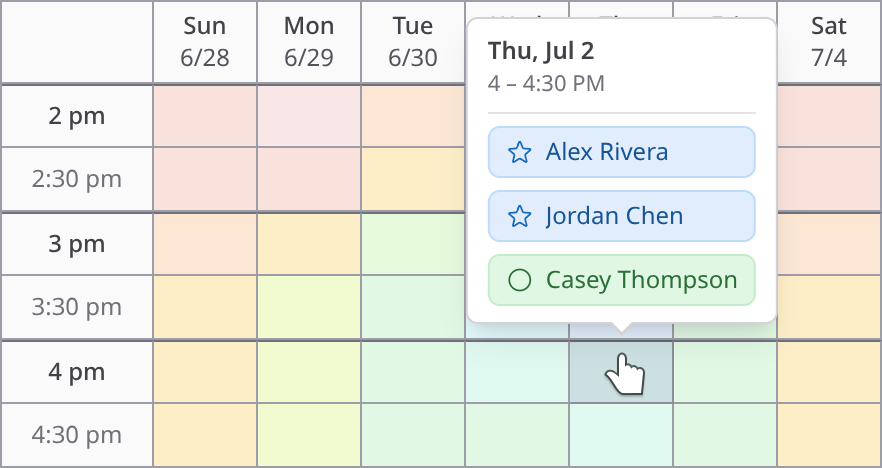
Executive assistants schedule the hardest meetings there are: several busy people, often at different companies, each with a calendar no one else can see. ClearDate gives everyone one link to share their availability and preferences on a simple visual grid - and shows you the time that works best for the whole group at a glance.
The hardest scheduling happens between organizations
Inside a single company, a shared calendar can get you most of the way there. But executive assistants rarely have that luxury. The people who need to be in the room are spread across different organizations, each on its own calendar system that no one outside can see. There's no shared free-busy to check, and no integration that reaches across company lines.
Even when you can see someone's calendar, it often wouldn't help. Executives' schedules are usually full - sometimes double-booked or worse - so "busy" tells you almost nothing. A packed calendar can't tell you which slot someone would actually rearrange things for. You still have to find the time for the meeting that matters.
ClearDate works regardless of what calendar anyone uses. Instead of trying to read availability off systems you can't see, it asks each person directly - and captures the preferences a calendar never could.
Collect availability without chasing down accounts
You don't always have everyone's email address, and the people you're coordinating won't want to create an account just to tell you when they're free. So ClearDate doesn't make them.
Share a single link wherever the conversation is already happening, and anyone with it can respond - no sign-up required. They open the link, color in their availability, add their name so you know who replied, and send. If you do have email addresses, you can invite people directly instead.
And for the one person who tells you their availability but never gets around to entering it, you can fill it in on their behalf - so everyone's availability lives in one place and stays easy to compare.
Capture preferences, not just yes or no
When you're scheduling busy people, a plain yes/no misses what matters most. ClearDate asks for four levels instead of two: conflict, maybe, available, and preferred. That nuance is the difference between a time everyone can technically make and a time the group is actually able and willing to commit to.
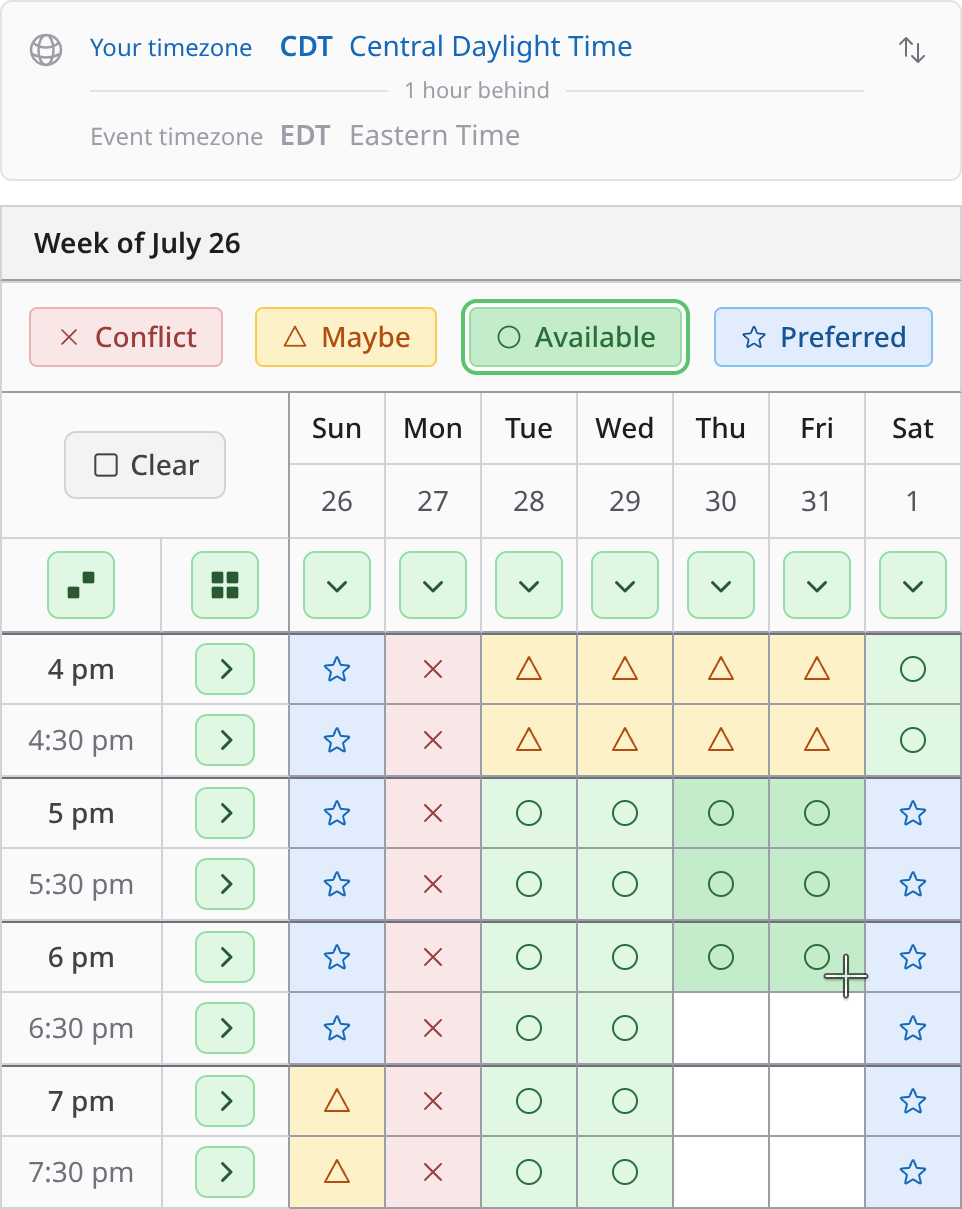
Filling it in is fast, which matters when what you're asking for is a minute of a very senior person's attention. Try it out in a demo.
Find the time that works - and focus on who matters
As responses come in, ClearDate overlays everyone's availability into a single visual summary. The best options stand out immediately - you can see at a glance where the group converges and which times have the strongest preference. No spreadsheet, no reading back through a thread.
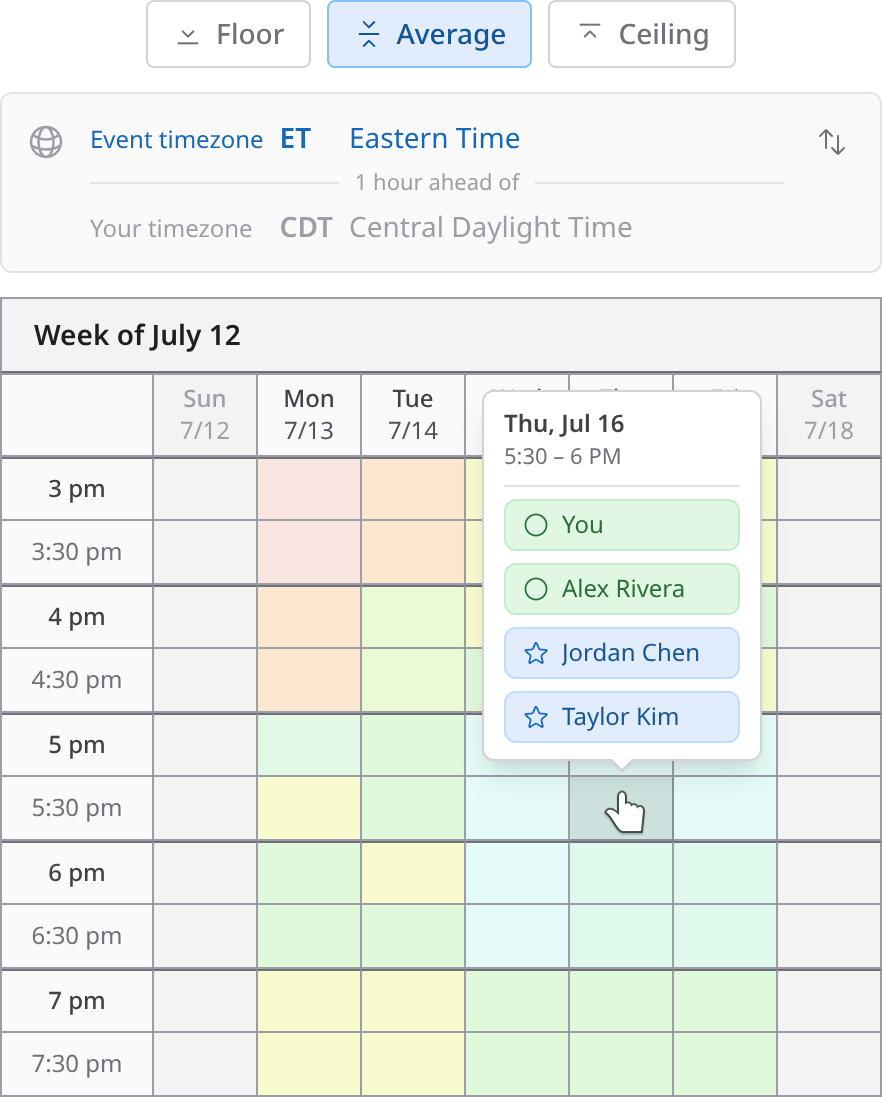
Not everyone weighs the same. Toggle individual participants on and off to focus on the people who have to be there, so the must-attends drive the decision and optional attendees don't skew it. From there, the comparison modes let you switch between strict overlap and overall sentiment. See the comparison view.
Made for people in different time zones
Coordinating across organizations usually means coordinating across time zones too - and the people whose calendars you're protecting are the least forgiving audience for an invite that lands at 6 a.m. their time.
Every ClearDate event is anchored to a time zone you choose when you create it, and each attendee can flip the whole grid into their own. What you're looking at and what they're looking at stay in step, so a slot that reads as a comfortable mid-morning to you is never quietly someone else's evening.
Polished enough to put in front of anyone
Every invite you send represents you - and the people you work for. A lot of scheduling tools make that a gamble: free tiers crowded with ads, interfaces that look like they were built fifteen years ago, or weekend projects that feel fragile the moment someone important clicks the link.
ClearDate is built with care, and it shows. The experience is clean, modern, and completely ad-free - for hosts and guests alike. You can send a link to a board member, a client, or your principal's counterpart at another company without a second thought about how it reflects on you.
At a glance
The email-and-text back-and-forth
- Collecting times
- Reply-all threads
- Across orgs
- No shared calendar
- Responding
- Everyone must reply
- Preferences
- Buried in the thread
- Best time
- Cross-reference by hand
- Time zones
- Mental math
ClearDate
- Collecting times
- One shared link
- Across orgs
- Any calendar system
- Responding
- No account needed
- Preferences
- Four preference levels
- Best time
- Visual overlay at a glance
- Time zones
- Event + personal toggle
How ClearDate works
Every organization on the invite has its own calendar system, and none of them talk to each other. ClearDate doesn't try to make them: set the dates worth considering, send one link, and let each person tell you directly what works - including the ones whose availability you fill in yourself. See how it works, step by step →
Schedule your next meeting the easy way
Free for your first 3 events, then $2 each. No subscription.
Frequently asked questions
- Yes - that's exactly where it helps most. ClearDate works regardless of what calendar system anyone uses, so it doesn't matter that attendees are at different organizations with calendars no one else can see.
Everyone gets one link, shares their availability on a visual grid, and the best time emerges from the group.
- Calendar integrations only show free or busy, and they can't see across company boundaries. They also miss the reality that executives' calendars are often full or double-booked - a packed calendar can't tell you which slot someone would actually rearrange things for.
ClearDate captures real preferences, not just whatever is technically open.
- No. You can share a single link, and anyone with it can respond without signing up - they just add their name so you know who replied.
Attendees can create a free, passwordless account if they want to track their events, but it's never required to respond.
- Yes. On the comparison view you can toggle individual participants on and off, so you can focus on the people who have to be there and keep optional attendees from skewing the decision.
You can also see how the best times shift for different subsets of the group.
- If someone tells you their availability but won't enter it themselves, you can fill it in on their behalf, so everyone's availability lives in one place and is easy to compare.
It's a quick way to keep one slow responder from holding up the whole group.
- Attendees mark each time slot as conflict, maybe, available, or preferred.
That extra nuance matters when you're scheduling busy people - you can find the time the group is most able and willing to make, not just a time that technically works.
- Yes. You set the event's timezone when you create it, and ClearDate supports all major time zones worldwide.
Anyone looking at the event can switch between the event's timezone and their own, so there's no mental math about whose time is whose.
- Yes. ClearDate is clean, modern, and completely ad-free, for hosts and guests alike.
There's no clutter or upsell getting in the way, so you can send an invite to an executive, a client, or a counterpart at another company without worrying about how the tool reflects on you.
- Your first 3 events are free - no credit card required. After that, events cost $2 each on a pay-as-you-go basis, with no subscription required.
An unlimited plan is available if you schedule frequently, but it's never required. Responding to an event is always free.