
ClearDate vs Doodle
A modern, ad-free alternative to Doodle for finding a date that works for everyone.
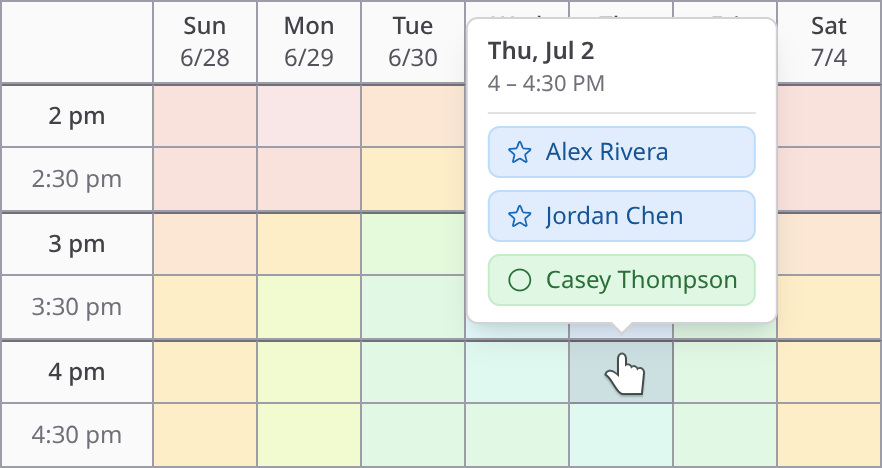
Doodle has been the go-to scheduling poll for years, but its free tier keeps getting narrower — as of August 2026, one active group poll, 10 time slots, and ads for every guest — and its best features are locked behind a monthly subscription. ClearDate takes a fundamentally different approach: a visual availability grid with pay-as-you-go pricing and no ads at any tier.
Express preferences, not just votes
Doodle works like a poll: the organizer picks a few candidate times and participants vote yes, no, or if-need-be. It's quick, but it's limited. You only find out about the times the organizer thought to suggest. If the perfect time wasn't on the list, no one ever knows.
ClearDate takes a different approach. Instead of voting on a shortlist, participants paint their availability across the proposed dates and times using four intuitive levels: conflict, maybe, available, and preferred.
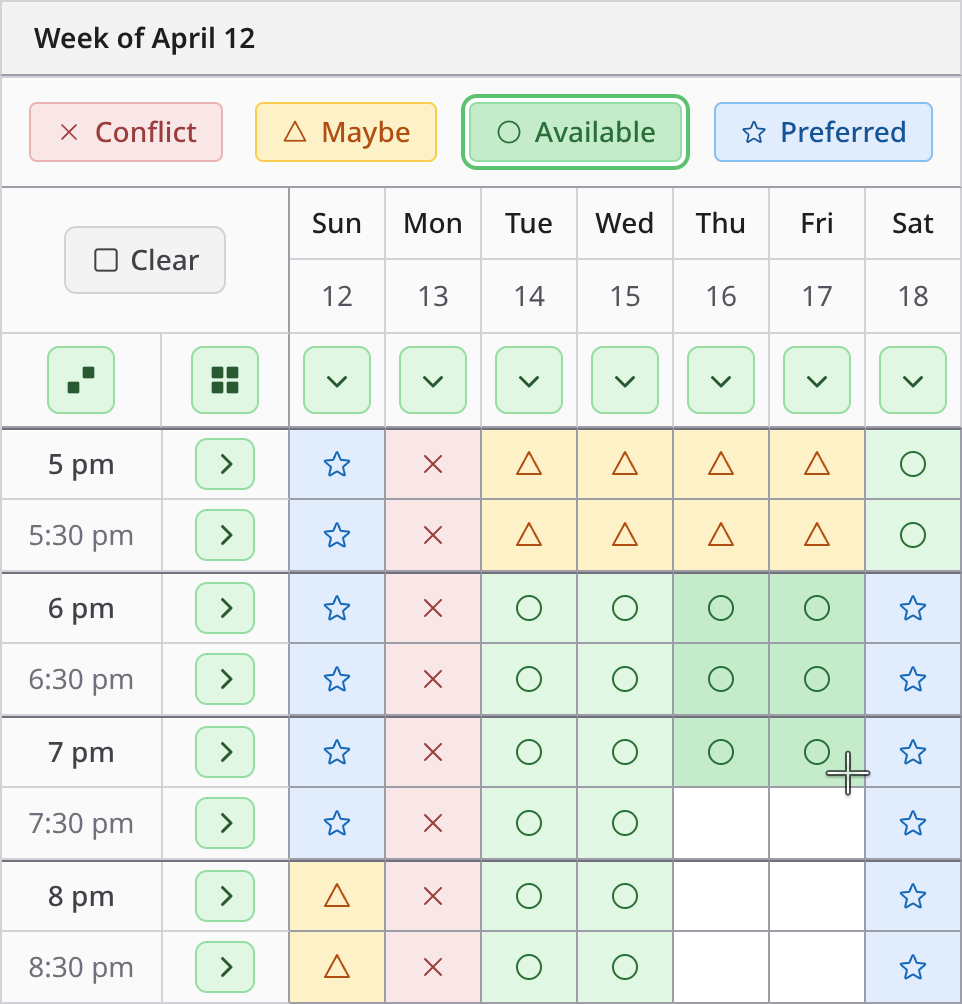
With Doodle, you get three signals: yes, no, and if-need-be. With ClearDate, you get four - and the difference matters. A host choosing between a time that's merely available for everyone and a time that's actively preferred by most of the group is going to make a better decision. That nuance doesn't exist in a yes, no, if-need-be poll.
Filling it in takes seconds, not the click-by-click slog of working down a long list of options. Try it out in a demo.
See everyone's availability at a glance
With Doodle, once responses come in, you're looking at a grid of checkmarks and question marks. With many participants and time options, figuring out the best option becomes a manual counting exercise.
ClearDate aggregates all responses into a visual summary that overlays everyone's preferences. The best options stand out immediately - you can see at a glance where the group's availability converges, and which times have the strongest preference. No counting, no squinting at checkmarks.
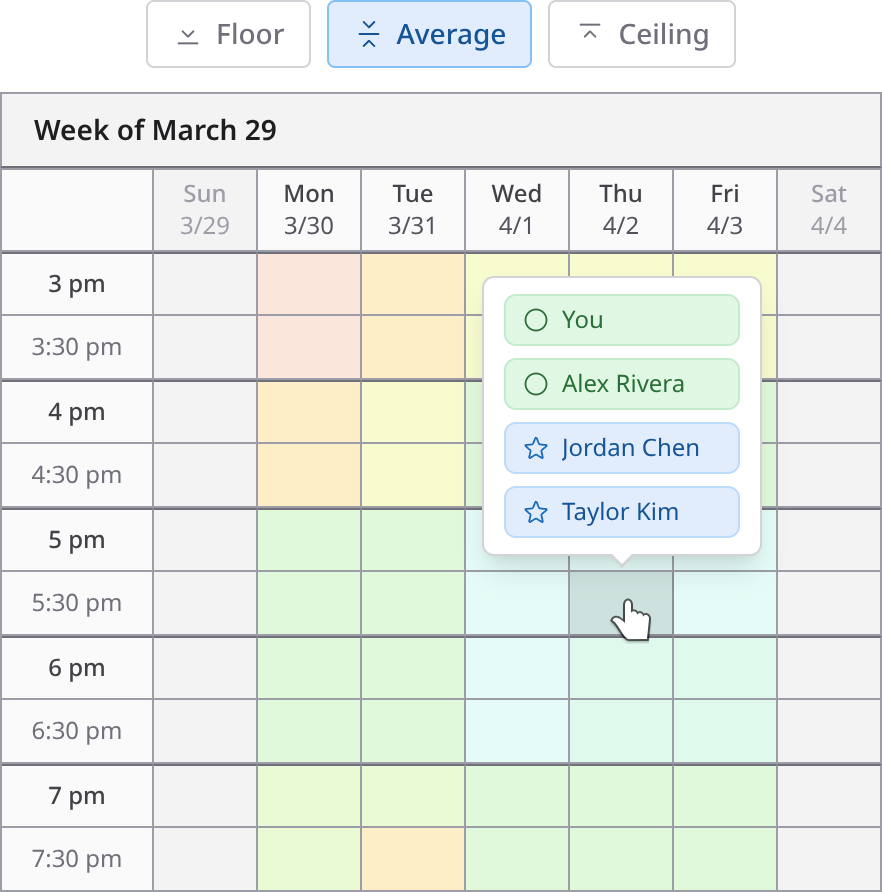
Hover over any time slot to see exactly who said what, and toggle individual participants on and off to see how availability changes for different subsets of the group. You can also switch between three comparison modes - floor, average, and ceiling - to read the same responses from different angles. Try it in a demo.
A familiar, calendar-like interface
Think of ClearDate as a cross between Google Calendar and Google Sheets - with some special superpowers. The layout is the familiar calendar view you already use every day, but each time slot is editable like a cell in a spreadsheet. If you've used a calendar app, you already know how to use ClearDate.
This makes a real difference when you're filling in your availability. With ClearDate, you can have your calendar open alongside it and naturally scan through your week, coloring in slots as you go. With Doodle, you're looking at a flat list of specific times the organizer picked and mentally translating each one against your calendar - a slower, more error-prone process, especially when there are many options.
No ads, no subscription tax
Doodle's free tier shows display ads and persistent upgrade prompts. This is the experience your guests see when you send them a Doodle link. Removing the ads requires Doodle Pro, which runs $11 a month billed annually or $15 month to month, and also unlocks features like deadline reminders and custom branding. If you only schedule events occasionally, paying monthly for a tool you use a few times a year is a tough sell.
ClearDate has no ads at any tier and nothing to keep alive between events: your first 3 events are free, then it's $2 per event as you go. See pricing →
Responding is always free for guests, so the result is a clean, distraction-free experience for both you and the people you invite.
A different approach to finding a time
Doodle is a polling tool - the organizer picks specific time slots and participants vote on them. That works when you already know the right times to suggest, but it has a structural limitation: the options are only as good as the organizer's guesses.
Consider a common scenario. You create a Doodle poll with two options: 3-5pm or 5-7pm. Everyone votes "no" on both. What you didn't know is that most of the group could have done 4-6pm, or even 3:30-5:30. But because the poll only asked about the specific windows you chose, that overlap never surfaced. With a larger group or a busy week, the odds of guessing the right slots get even worse.
ClearDate sidesteps this entirely. Instead of voting on a handful of pre-selected options, participants paint their availability across the full range of possible times. The best option emerges from the actual data rather than from the organizer's best guess. If there's a 4-6pm sweet spot that nobody would have thought to suggest, it shows up naturally.
If you've ever sent a Doodle poll, gotten back a sea of "no" votes, and had to start over with new options, you know the problem. ClearDate means you don't have to guess.
Invite by link, respond without an account
You don't always have everyone's email handy, and you're usually already talking to the group somewhere - a text thread, a group chat, a Slack channel. Grab a single ClearDate link and drop it right where that conversation is already happening. You can also pull people from your saved contacts or add email addresses directly, and mix all three in the same event.
Anyone with the link can open it and fill in their availability without creating an account - they just add their name so you know who responded. It's as quick to respond to as a Doodle poll, with none of the ads your guests see on Doodle's free tier.
The answer that arrives by email, not by link
There's always someone who replies "I'm free any day next week except Tuesday" instead of opening the link at all.
On Doodle's free tier you can't do anything with that even if you want to - adding or editing poll participants is a paid feature. So the reply sits in your inbox, the poll goes on showing that person as missing, and you hold the reconciliation in your head until they get around to voting.
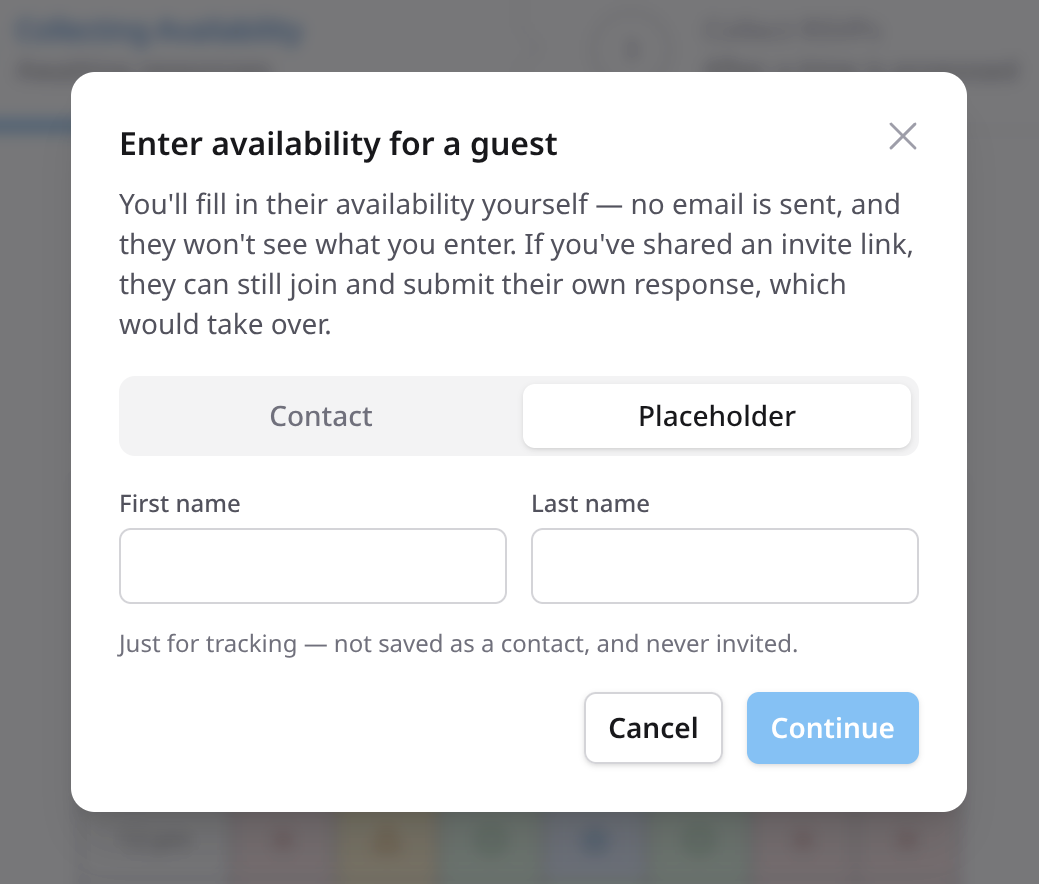
ClearDate lets you enter it for them. Add their name, color in the slots they described, and save. Their availability lands in the same grid as everyone else's, and the picture is complete without another round of chasing.
At a glance
Doodle (free)
- How you respond
- Vote on organizer's picks
- Preference levels
- 3
- Fill in for a guest
- No
- Time zones
- Supported
- Guest experience
- Ads and upgrade prompts
- Display ads
- Yes
- Subscription
- No (limited)
- Cost to host
- Free (with ads)
- Cost to respond
- Free (with ads)
- Free events
- One group poll
- Time slots
- 10 max
Doodle Pro
- How you respond
- Vote on organizer's picks
- Preference levels
- 3
- Fill in for a guest
- No
- Time zones
- Supported
- Guest experience
- Clean
- Display ads
- None
- Subscription
- $11-15/mo
- Cost to host
- $11-15/mo
- Cost to respond
- Free
- Free events
- Unlimited (paid)
- Time slots
- Unlimited
ClearDate
- How you respond
- Paint your full availability
- Preference levels
- 4
- Fill in for a guest
- Yes
- Time zones
- Event + personal toggle
- Guest experience
- Clean, distraction-free
- Display ads
- None
- Subscription
- Not required
- Cost to host
- $2 per event
- Cost to respond
- Free
- Free events
- 3 free
- Time slots
- Unlimited
Doodle details verified against Doodle's pricing page and help center, August 2026.
How ClearDate works
Where a Doodle poll asks your group to vote on the times you guessed at, ClearDate asks them to color in the times they can actually do - and then shows you where the group converges. Create the event, share one link, and watch the responses land. See how it works, step by step →
Ready to swap the poll for a grid?
No ads. No subscription. Your first 3 events are free.
Frequently asked questions
- Your first 3 events are completely free - no credit card required. After that, events cost $2 each on a pay-as-you-go basis. There's no subscription required, though an unlimited plan is available if you prefer.
Responding to an event is always free for guests.
- Yes, but the free tier is narrower than many people remember. It covers a single group poll, capped at 10 time slots, and shows display ads to you and to everyone you invite. Lifting those limits means upgrading to Doodle Pro.
ClearDate's first 3 events are free with no cap on time slots and no ads at any tier, then events are $2 each.
The full story of what changed is in Is Doodle still free? What changed in 2026.
- Doodle Pro currently runs $11 per month billed annually, or $15 month to month. That's what unlocks unlimited polls, unlimited time slots, and an ad-free experience for you and your guests.
ClearDate has no subscription to buy: your first 3 events are free, then each event costs $2, and guests always respond for free. If you schedule constantly there's an unlimited plan at $10 a month, but for a handful of events a year, paying per event usually costs less than a single month of Doodle Pro.
- Doodle is a polling tool - the organizer picks specific times and participants vote yes, no, or if-need-be. ClearDate takes a different approach: participants paint their availability across all proposed dates and times using four preference levels.
The best option emerges from the actual data rather than from the organizer's best guess.
- Never. ClearDate has no ads at any tier. The experience is clean and distraction-free for both hosts and guests.
Unlike Doodle's free tier, which shows display ads and upgrade prompts, ClearDate is funded by pay-as-you-go event credits instead of advertising.
- Participants mark each time slot as conflict, maybe, available, or preferred.
This gives the host a much richer picture than Doodle's yes/no/if-need-be system - you can find the time the group is most excited about, not just a time that technically works.
- No. Anyone with the link can respond without signing up - they just add their name so you know who replied.
The difference from a Doodle poll is what they don't get along the way: no display ads, no upgrade prompts, and nothing trying to convert them while they answer.
- Yes. The availability grid is responsive and touch-friendly, so guests can color in their availability from a phone as easily as from a laptop - which matters, because a phone is where most people will open the link you send.
- Yes. Share one link in a group chat or text thread and anyone with it can respond, much as they would with a Doodle poll link - but without the display ads Doodle's free tier shows them along the way.
You can also invite by email or from your saved contacts, and mix all three in the same event.
- Fill their availability in yourself. If someone has already told you when they're free, add their name and color in the slots on their behalf, and their response sits alongside everyone else's.
Doodle's free tier won't let you do this at all - adding or editing poll participants is a paid feature - so an answer that arrives by email stays stranded there.
- Yes. You pick the event's time zone when you create it, choosing from a list that spans the globe, and anyone looking at the event can switch between that and their own local time.
Both stay one tap apart, so nobody has to work out whose 3 p.m. is whose.