
If you’ve ever gone looking for an app to help a group make plans, you’ve probably come across a bunch of options called shared calendars, group calendars, group schedulers, and availability tools. Those all sound like the same thing, but they’re really two different kinds of tools built for two different jobs, and picking the wrong one usually ends with an abandoned app and going back to figuring things out over a group chat.
It all comes down to one question: are you trying to keep track of plans that already exist, or trying to schedule an event that doesn’t exist yet?
What a shared calendar app does
The first category is what I’ll call shared calendar apps. They provide one collaborative calendar that a whole group can see and add to, so everyone knows when the others are free, when they’re busy, and what they’ve got coming up.
These apps are invaluable for keeping a family in sync, keeping a busy couple on the same page, managing a team at work, or helping a close friend group stay connected. Most include some kind of calendar sync. In some, you can sync the shared calendar into your own personal calendar (usually Google, Outlook, or Apple Calendar). In others, it goes the opposite direction, and you sync your personal calendar into the shared one.
Here are some of the most popular options:
Cozi (cozi.com). Geared toward families, Cozi pairs its shared calendar with shopping lists, to-do lists, and a recipe and meal planner. You can set up a read-only sync of the shared Cozi calendar into your Google, Outlook, or Apple calendar.
TimeTree (timetreeapp.com). TimeTree also works well for families but is a little more general-purpose, without the bundled household features. With TimeTree, you sync your external calendar into the shared calendar.
Howbout (howbout.app). Howbout is a newer, more social take on the shareable calendar app, built for friend groups, couples, roommates, co-parenting, and more. You can sync an external calendar into Howbout, and on mobile you can see your shared calendar in your personal calendar.
GroupCal (groupcal.app). GroupCal adds administrative features suited to teams, businesses, community groups, and schools. It syncs your personal calendars into the shared calendar.
If a shared group calendar is what you need, give one of these a try. ClearDate isn’t a shared group calendar.
Where a shared calendar falls apart
A shared calendar only works if everyone adopts it and keeps it current indefinitely. That’s a fair ask for a household. It’s a much bigger ask for eight friends trying to plan one dinner. If you try to make it work with the wrong group, it usually falls apart. Three people never open it again, the calendar goes stale, and the group ends up back in the group chat.
What a shared calendar can’t tell you
Even a perfectly maintained shared calendar has a limit, though: it doesn’t work well to help you find a time that isn’t on the calendar yet, especially if it involves people you don’t share a calendar with.
I don’t know about you, but I don’t want a shared calendar with everyone in my fantasy football league just so we can pick a date for the draft.
And even if we had one, would it help? Does a blank day mean someone’s actually free? Or do they have something that just hasn’t made it onto the calendar yet, or that lives on a calendar they never synced? If they do have an event that day, are they actually busy? Or is it just something they’re keeping an eye on, not something that would keep them from a draft?
A calendar can tell you what’s already been added to it, but everybody has a different threshold for what makes it on the calendar. For some people it’s birthdays, anniversaries, vacations, and doctor’s appointments. For others, it’s when they wake up, shower, eat, and commute, plus every work meeting, errand, and hangout in between.
A calendar can’t tell you when you’d like to attend a fantasy draft, a bachelorette party, a strategy meeting, a networking coffee, or a game night (or when you’d really rather not do any of those things). A calendar is a record of known facts. Only you know when you actually have the time and energy for an event, and when you technically could go but shouldn’t.
When you need a group scheduling tool instead
If you’re trying to get a group of people to tell you when they would actually attend a specific event, and you want to compare everyone’s answers without scrolling back through chat histories, what you need is a group scheduling tool.
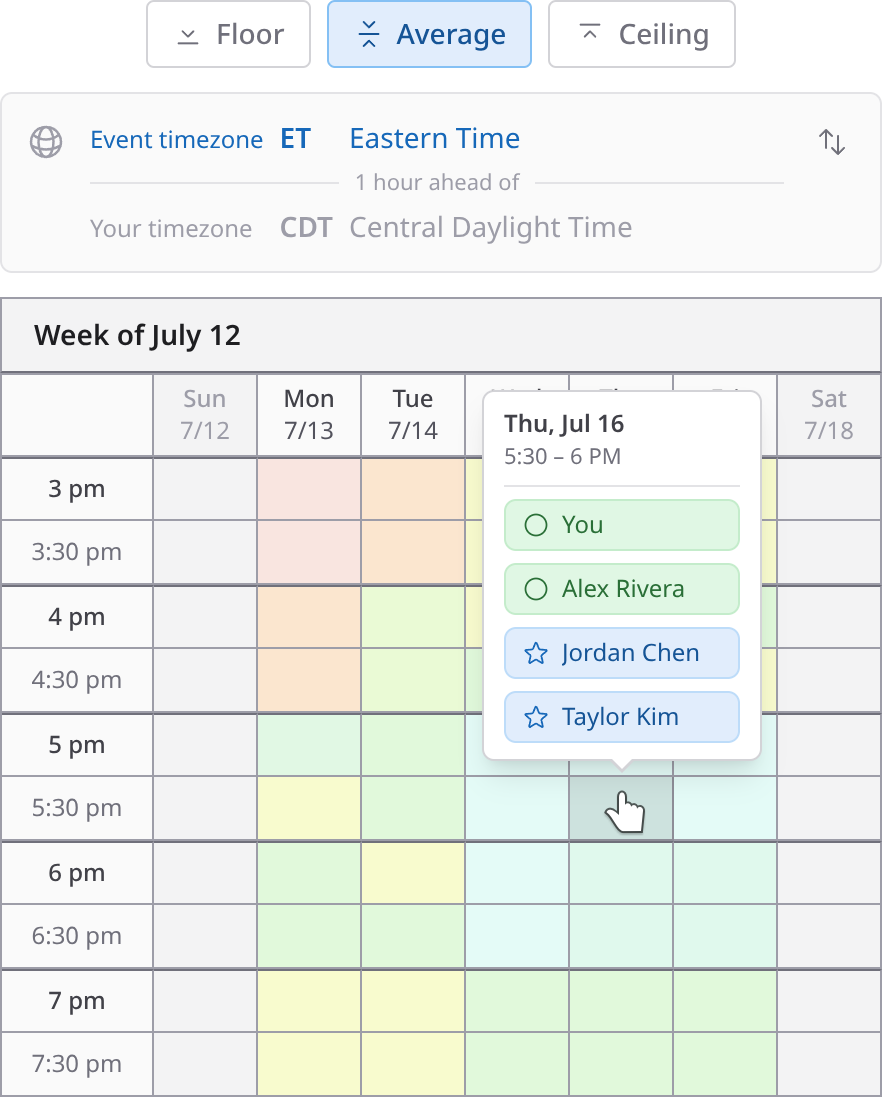
A group scheduling tool lets you quickly create an event, laying out a range of candidate dates and times and how long the event will run, and send a link to the people you’d like to attend. Each person fills in their availability once, which takes a couple of minutes and doesn’t require an account or installing anything. As responses come in, you see everyone’s availability overlaid, the best options become obvious, and you pick one. Everybody gets the invite, and the tool’s job is done.
Notice the difference in what’s being asked of people. A shared calendar needs ongoing effort from the whole group (not to mention sharing your whole life schedule with a group of people or carefully curating what you do share). A scheduling tool needs about two minutes from each person, one time. For a household, the ongoing effort makes total sense. For one event, it’s overkill. Your fantasy league probably doesn’t need a shared calendar to pick a draft date.
I built ClearDate to make group scheduling quick and easy. You create an event, everyone colors in their availability, including the difference between “I can’t do it then,” “I could make it work if I had to,” “I’m free here,” and “this time would be best for me.” All the responses get overlaid so the answer jumps out. If you’re curious, you can see how it works.
Which one do you need?
Is this a standing group or a one-time gathering? A family, a household, or a team that coordinates every single week can justify a shared calendar. If you’re finding a date for one specific thing, use a scheduling tool.
Do the plans already exist? Keeping track of what’s already been decided is a calendar job. Making a decision that hasn’t happened yet is a scheduling job.
Will everyone maintain it? If you can’t picture every person in the group still updating the app a month from now, don’t build your plans around it. A scheduling link doesn’t require any ongoing commitment.
Do these people even know each other? Shared calendars only work well between people with a standing relationship. With a scheduling tool, you can still effectively schedule an event when the guest list includes your neighbor, your college roommate, your sister-in-law, and coworkers from three past jobs.
You might end up with both
The two types of tools can complement each other. A family that runs its whole life on Cozi still has to ask the grandparents and cousins when they’re available for a reunion weekend. A friend group on Howbout still needs to find the one Saturday everyone can make the cabin trip. Finding the right date is a scheduling job. Keeping track of that date in relation to the rest of your schedule going forward is a calendar job. The selected time from a scheduling tool should go onto everyone’s calendars, shared or otherwise.
The takeaway
If you’ve got a close group of people and you want everyone in sync on what’s going on day to day, a shared calendar is indispensable, and the four apps above are good places to start. If you want to find a time to get a group of people together for a specific event, reach for a group scheduling tool, and spend the time you save deciding what to bring (or which quarterback to draft).
If you’re looking to schedule an event, you can try ClearDate for free.