
ClearDate vs LettuceMeet
How the free availability grid compares to ClearDate's group scheduling features.
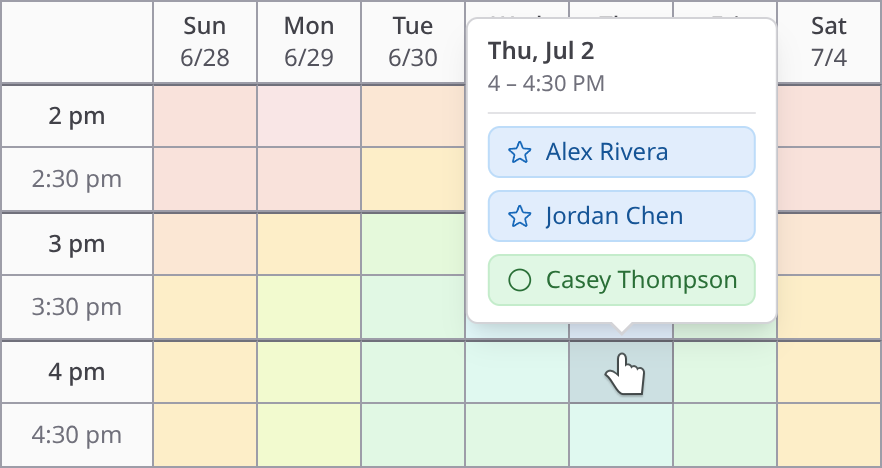
LettuceMeet is a well-made free availability grid: clean design, no ads, no account required, and a link you can share with your guests. ClearDate keeps the grid and adds four preference levels, three ways to compare the responses, contact management, and email notifications at each step.
Free or busy is only half the answer
Filling in a LettuceMeet event is simple: drag across the times you're free and those slots turn green. The grid only captures two states though: available or not. Anyone who has tried to get eight people to a dinner knows the real answers are messier, more like "I could make Thursday work if that's the only time everyone else can" or "there's no way I can make it Sunday."
ClearDate allows you to capture four levels instead of two: conflict, maybe, available, and preferred. Instead of a sea of different shades of green, you can see when people would actually prefer to meet.
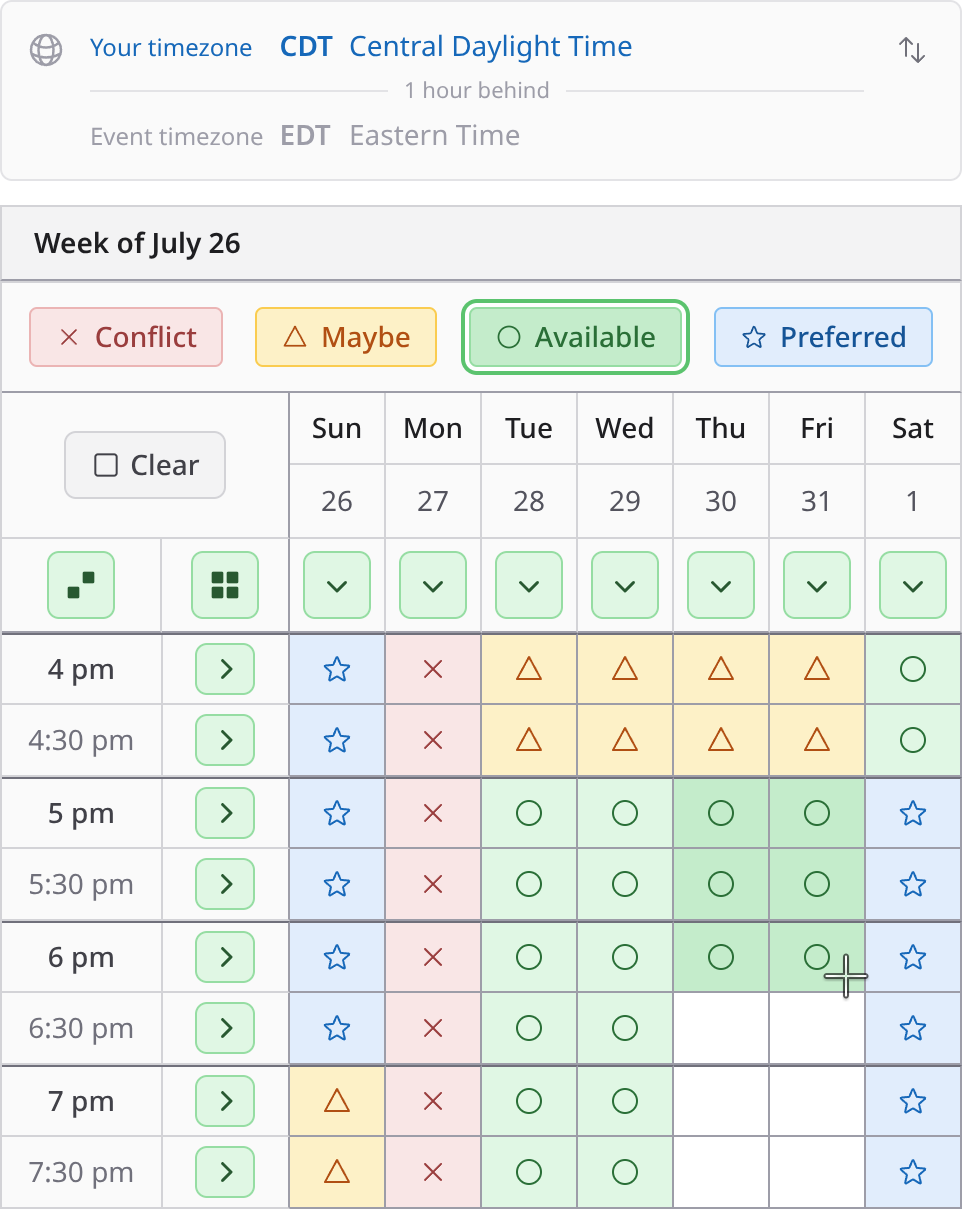
Responding in ClearDate still takes about a minute. But there are some nice features that make it easier and more intuitive. First, it's always formatted like a calendar, so you can easily compare against your actual calendar. In LettuceMeet, the dates just keep scrolling to the right. And if the host picked dates that aren't next to each other, they are all just lined up side-by-side, making you have to really pay attention to the invisible gaps.
Second, it's always clear what type of availability you're entering. You simply pick it from the set of options above the calendar and then apply it to the calendar - either by directly clicking on a cell, dragging a set of cells, filling an entire row or column, filling the entire grid, or filling all remaining spaces. In LettuceMeet, if you click on a white space, it starts filling in green. If you click on a green space, it starts filling in white (or erasing green). It seems intuitive enough, but in practice, it can get pretty finicky. Try a demo of filling in a sample calendar in ClearDate.
Not all meetings are the same shape
LettuceMeet events always allow the user to fill in time down to the half-hour (and there's no visual divider at the half-hour mark, so it's a little hard to tell exactly what you're doing). That works great for some events, but other times, you actually want to know down to 15-minute intervals. Other times, you really only want to know by the hour. And sometimes, you're really just looking for dates, not specific times.
In ClearDate, you can pick the size that makes sense for your event and the calendar adjusts to work naturally with those time slots (or full dates).
LettuceMeet provides an option to limit the scheduled meeting time to somewhere between 30 minutes up to 3 hours (or no limit), but in practice, it doesn't seem to really do much for you other than arbitrarily limiting your choice.
The app should make it easier to compare responses
As LettuceMeet responses come in, the grid darkens where people overlap: more green means more people. With four friends and one obvious winner, that's all you need. With ten people, partial overlaps, and no perfect slot, every candidate time is a slightly different shade of green and you end up cross-eyed trying to figure out where the trade-offs are and which ones might be best.
ClearDate overlays all of the responses onto the same calendar view so you can reason about it like a calendar. You can hover (or tap) any slot to see who said what. You can toggle guests on or off to see what the picture looks like with different people in or out.
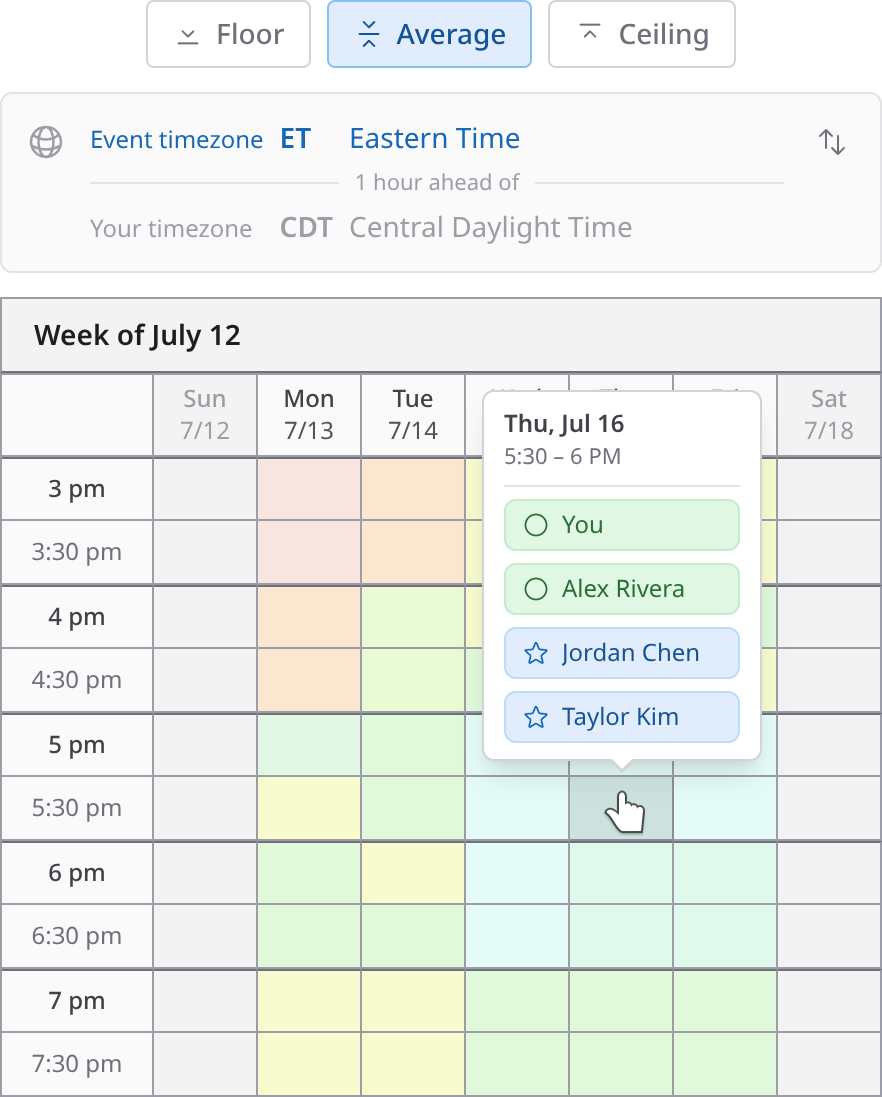
In ClearDate, you can also switch between three different views of the responses. The floor view shows the worst response that anybody had for each time. So if anyone said they had a conflict, then the cell is red. If the worst anyone said is "maybe," then it's amber. Green and blue cells are the ones where everyone's available or agreed on a preferred time. This allows you to quickly see the times that everyone can attend.
The ceiling view shows the best response that anyone had for each time. If anyone said they prefer a time, then that cell is blue. If the best anyone said is available, then it's green. This view allows you to see where your guests' actual preferences are, not just when they're unavailable.
In the middle is the average view. This takes the average of everyone's response for each time slot, coloring each cell on a range from red (everyone said they had a conflict) through amber (the average of the responses came out to "maybe") through green (the average is "available") to blue (everyone prefers this time). There's more on all three modes on the features page.
Keeping track of who's responded
LettuceMeet's Share button copies a link that you can share with your guests. It works, but there's no way to verify that the person who responded is who you think they are and you don't get notified when they respond, so you have to keep checking back in the app.
ClearDate shares by link just as easily, and can also send email invitations when you have addresses. When you invite someone by email, they have to log in with that email so you know it's really them responding. And when someone responds, either through the link or an email invite, you get notified in the app and by email.
For the friend who answers in the group chat
You post the link to your group chat with eight people and seven of them respond in the app. The eighth person just replies in the thread: "any day but Tuesday works for me."
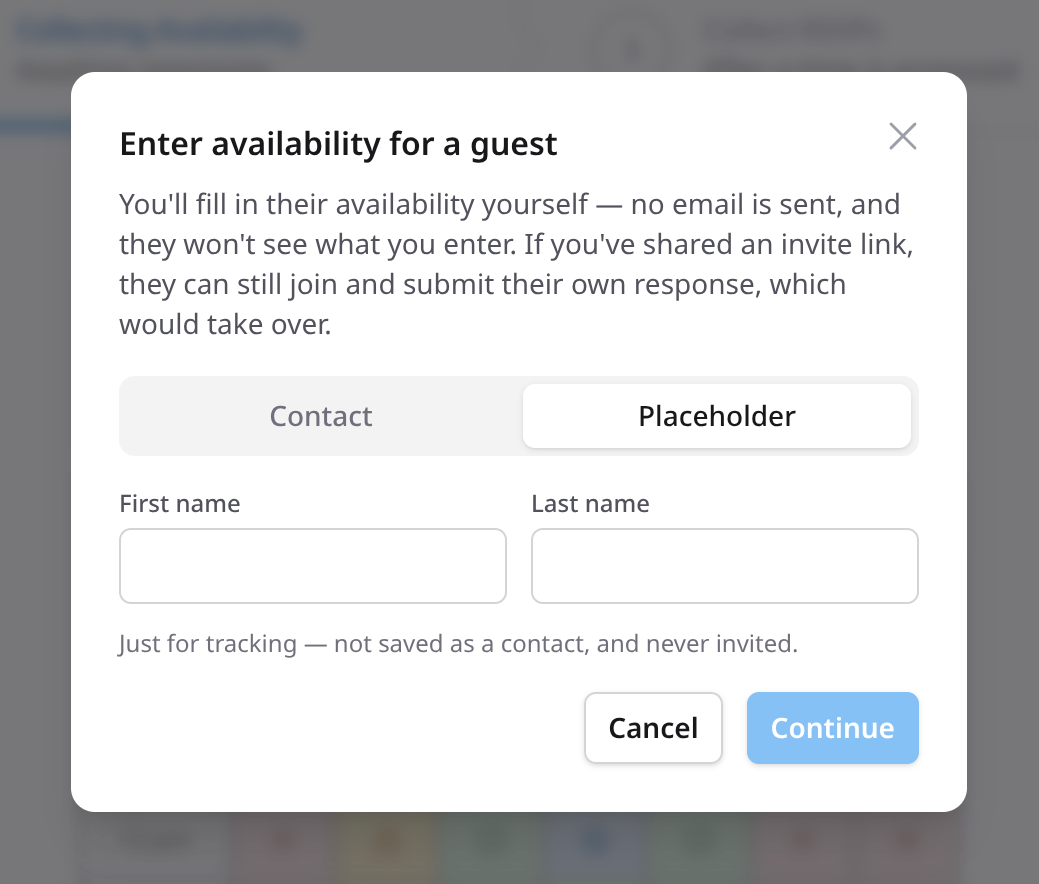
In ClearDate, the host can simply enter availability for that person so they can easily compare it in the same place as all the other responses and you can see which you've entered versus which were submitted directly by the guest.
In LettuceMeet, you can enter availability for anyone, but there's no way to distinguish which were entered by you and which were submitted by the guest themselves.
Privacy first
In fact, there's no way to tell who entered or edited any of the responses in LettuceMeet. Anyone with the invite link can enter availability, see everyone else's availability, and even edit anyone else's availability (except the host).
ClearDate takes a privacy-first approach. Only the host sees who has been invited, who has responded, and what their responses were. Guests can only edit their own response. Even guests who respond through the invite link and opt to not create an account receive a unique link allowing them to edit only their response.
The cost of free
LettuceMeet is truly free: no ads, no paid tier, and no upsell anywhere in the product. But, the product has changed little since launch and lacks many features that make the difference when actually pinning down a time that works for you and your guests.
ClearDate charges per event. Your first 3 events are free and each one after that costs at most $2, with no subscription required and no ads ever. That's what funds active development. If a free green/white grid covers your needs, LettuceMeet is a fine tool. ClearDate's stance is that a couple of dollars is worth it for the gatherings that matter. See pricing →
How LettuceMeet compares to When2meet and Doodle
LettuceMeet sometimes comes up as the nicer-looking When2meet and that's fair. Both are availability grids: everyone paints when they're free, and the overlap emerges. Doodle and Rallly belong to the other camp: polls, where the organizer proposes specific times and people vote on them.
If you're comparing grids, the question is how much you want the grid to do. When2meet and LettuceMeet both stop at binary free/busy availability. ClearDate keeps the paint-the-grid response and adds preference levels, three comparison views, and notifications along the way.
At a glance
LettuceMeet
- Preference levels
- 2
- Results view
- Heat map
- Fill in for a guest
- Workaround
- Inviting people
- Link only
- Response notifications
- Schedule only
- Privacy
- Everyone sees all
- Cost to host
- Free
- Time zones
- Local time
ClearDate
- Preference levels
- 4
- Results view
- Overlay + modes
- Fill in for a guest
- Built in
- Inviting people
- Link or email
- Response notifications
- App + email
- Privacy
- Host only
- Cost to host
- $2 per event
- Time zones
- Event + toggle
LettuceMeet details verified in-product at lettucemeet.com, August 2026.
How ClearDate works
Create an event with a range of candidate times, share one link or send email invitations, and let everyone color in their availability. The overlay shows you where the best times are. See the full walkthrough →
Ready to hear more than free or busy?
Your first 3 events are free. No ads and no subscription.
Frequently asked questions
- Your first 3 events on ClearDate are free, and each event after that costs at most $2, with no subscription and no ads.
LettuceMeet is entirely free, so the reason people switch is capability rather than cost: four preference levels, three comparison modes, and notifications for everything important.
- Both use the same core model: propose a range of times, and everyone paints their availability on a grid.
ClearDate responses carry four preference levels instead of a binary yes/no, the host gets a combined overlay with three comparison modes instead of a one-color heat map, hosts can fill in availability on a guest's behalf, and invitations and notifications are built in.
- Yes. Both are availability grids, and LettuceMeet is often described as a more modern-looking When2meet.
ClearDate is in the same category and keeps that paint-the-grid response style, while adding preference levels, more privacy, and better decision tools for the host.
- Red for conflict, amber for maybe, green for available, and blue for preferred.
Guests color each time slot with the level that matches, so the host can see which times are preferred, not just doable.
- No. Guests open the link and respond without creating anything, the same as LettuceMeet.
Accounts are optional, free, and add things like event history, contacts, and notifications.
- The first 3 events are free. After that, events cost at most $2 each through credit packs ($10 for 5 credits), or you can subscribe for unlimited events at $10 per month or $100 per year.
Responding to an event is always free.
- The host can answer for them. Add their availability from the guest list, color in what they told you, and their response is combined into the overlay with everyone else's, labeled as entered by the host.
- Yes. Every event has an event time zone, and each guest can flip the grid into their own local time while responding.
LettuceMeet also shows its grid in local time; ClearDate makes the event's home time zone explicit so nobody has to guess which zone the times are in.