
ClearDate vs Rallly
How the open-source meeting poll compares to ClearDate's availability grid.
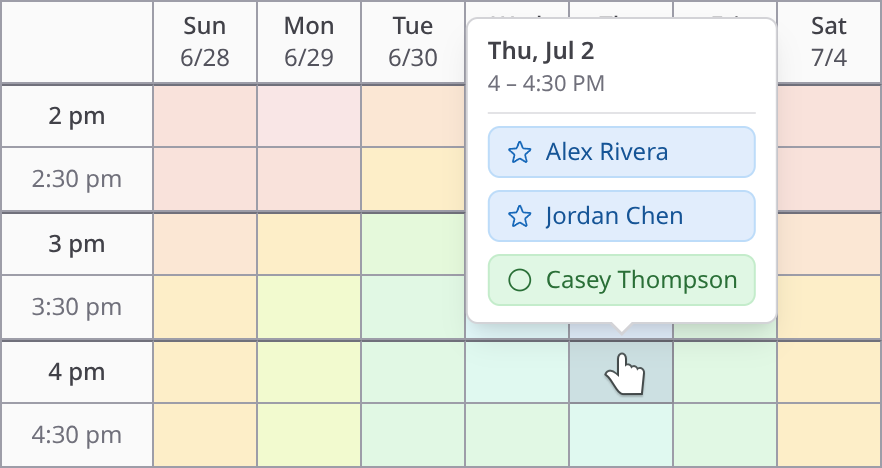
Rallly is a well-made open-source meeting poll: no ads, actively developed, and popular with the self-hosting community. ClearDate approaches the same problem differently. Instead of asking your group to vote on a few proposed times, everyone colors in their availability across a whole range, so the best time shows up even when nobody would have suggested it.
Voting only covers the times you propose
A Rallly poll starts with the organizer proposing a set of dates or time slots. Each participant votes yes, no, or if-need-be on every option, the votes add up, and the option with the most support wins. When you already have a short list of good candidate times, that works well enough.
The limitation is that the poll can only report on the times you proposed. If the group's best overlap falls somewhere you didn't think to include (or even just slightly before or after), the votes will never show it. You find out when every option comes back mostly "no," and the only fix is another round of guesses and another round of voting.
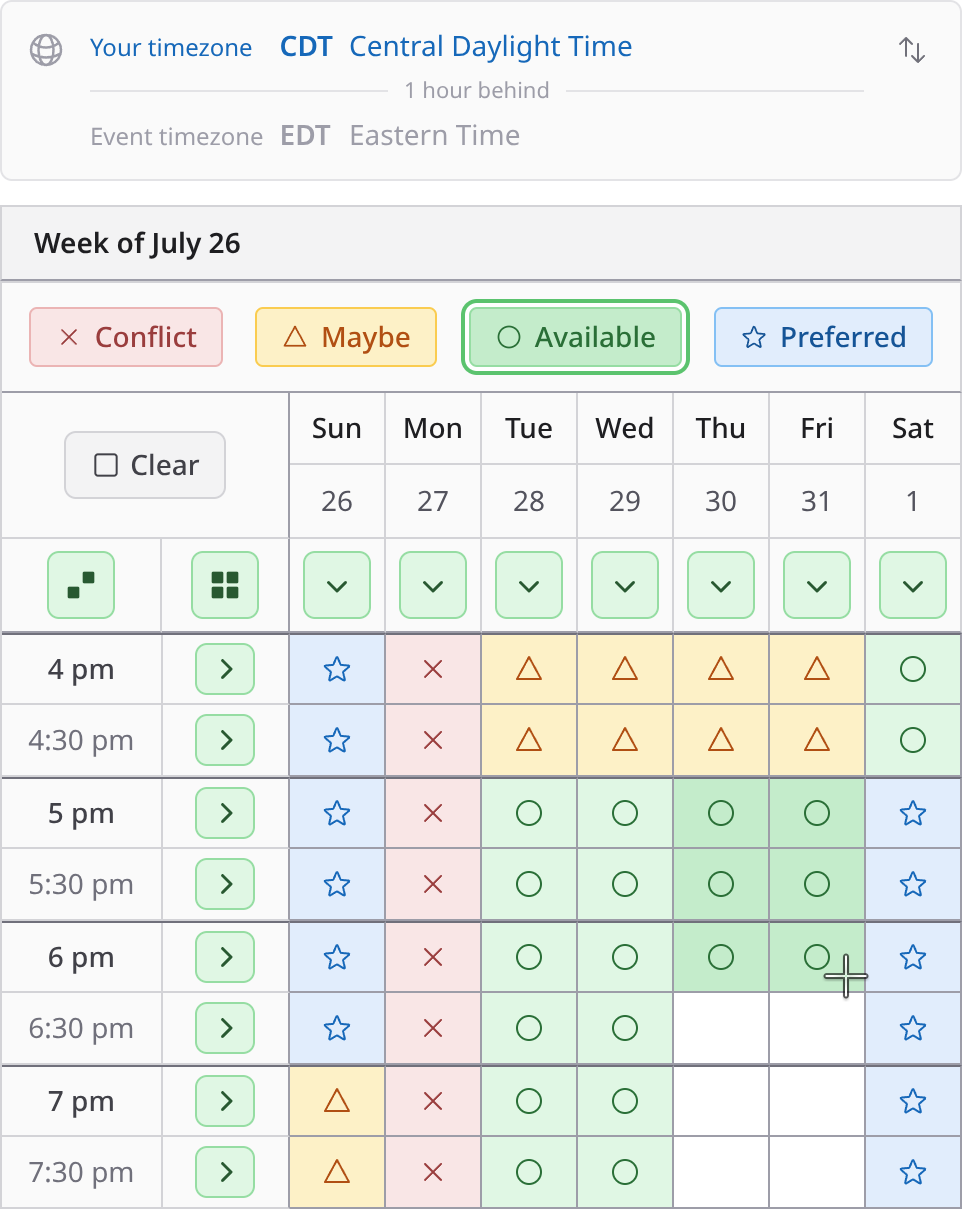
ClearDate starts from a range instead. Propose an evening each day next week, say, and everyone colors in what works for them across all of it. The overlap comes out of the responses themselves, so you don't need your first guess to be right. See what responding feels like.
Four preference levels instead of three votes
Rallly's if-need-be vote already goes one step past a simple yes or no. ClearDate goes a step farther and uses four levels: conflict, maybe, available, and preferred. The "preferred" option is what helps you actually find the best time, because it distinguishes a time everyone can tolerate from a time the group actually wants.
Entering a response is different too. Rallly gives each participant a list of options to vote through one at a time. ClearDate lays the candidate times out like a calendar, and you drag across slots to color them in. You can keep your own calendar open next to it and work through the week in a few strokes. With Rallly, you have to mentally translate your calendar to a horizontal list of dates and times.
Results you can read at a glance
When Rallly's responses come in, the host reads vote counts under each option: five yeses here, four and an if-need-be there. With a few options that's manageable, but as options and people multiply you end up comparing tallies by hand.
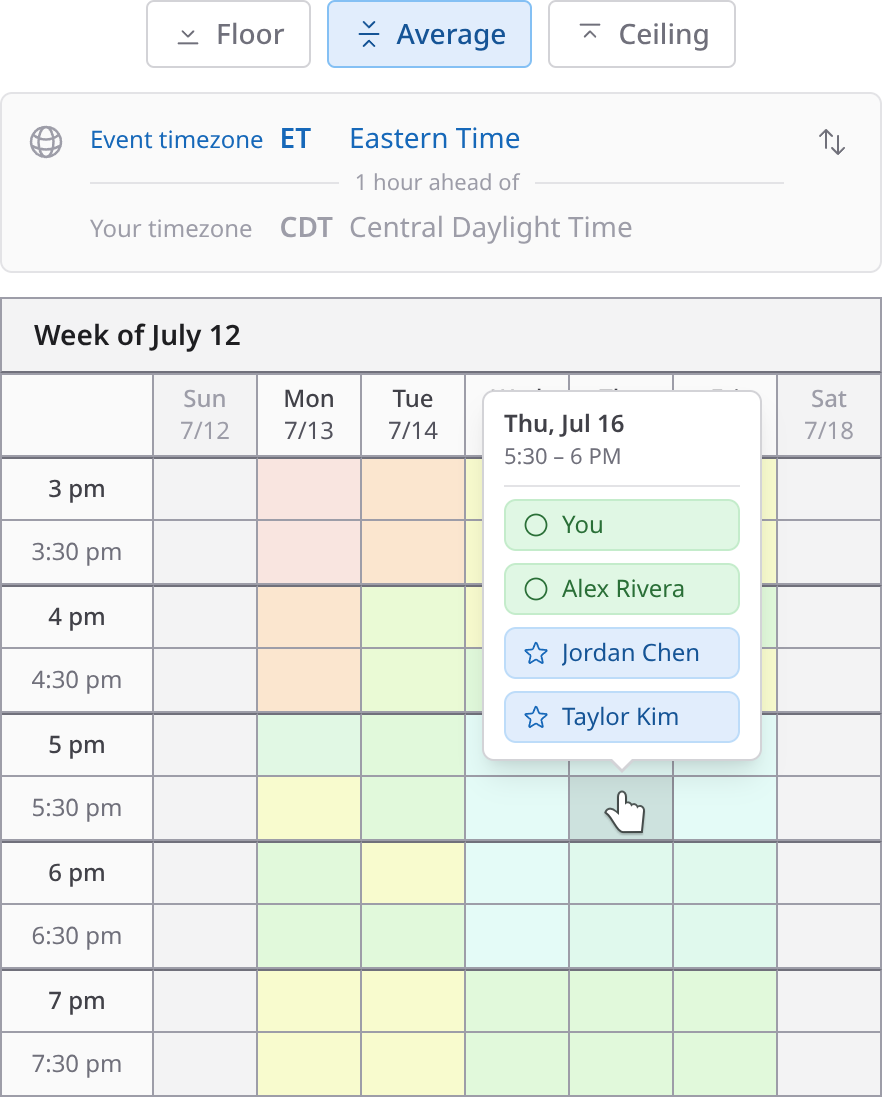
ClearDate combines every response into a single overlay, so the strongest times stand out visually. You can inspect a slot to see who said what, toggle participants off to see how the comparison changes without their availability, and switch between floor, average, and ceiling comparison modes for a cautious or an optimistic read of the same responses. Explore the host view in a demo.
When someone answers in the chat instead
There's usually one person who replies "any night but Wednesday" in the group chat and never opens the link.
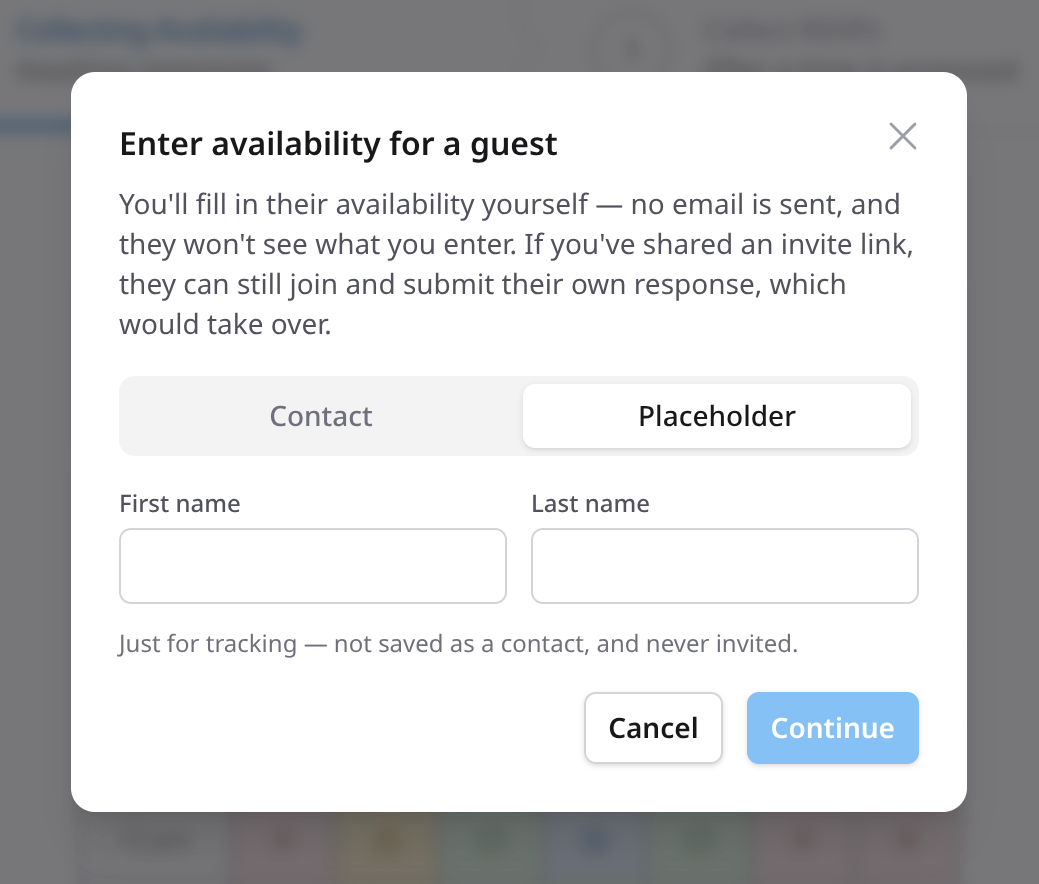
Rallly can cover for this if you know the trick: the poll admin is able to edit a response on a participant's behalf. ClearDate treats it as a normal part of hosting. Add their name, color in the slots they described, and save, and their availability shows up in the overlay along with everyone else's.
What features in Rallly do you have to pay extra for?
Rallly's free tier is genuinely free, shows no ads, and covers the core polling features. But, once a poll has been inactive for 30 days past its final date, it's deleted. Keeping polls around requires Rallly Pro at $7 a month or $56 a year. That's a fair price, but it's a subscription for something many people only do a few times a year. Also, unless you pay for the Pro subscription, participants can see each other's names and votes.
ClearDate charges per event. Your first 3 events are free, each one after that costs (at most) $2, and events stay in your account with their full response history. There's no monthly plan to keep paying for between gatherings. All events are privacy-first. Only the host sees the guests' names and responses. All features are included in all ClearDate events. See pricing →
If you want to host it yourself, use Rallly
Rallly is open source (AGPL), ships as a Docker image with a CLI installer, and a personal single-user instance is free to run, with team licenses from $49. If you want to own the infrastructure your scheduling runs on, it's one of the best choices in this category.
ClearDate is a hosted service only. Most people would rather have a purpose-built tool that just works instead of having to deal with hosting, networking, email deliverability, installation, maintenance, upgrades, and all of the headaches that come with running your own software services.
Coming from When2meet or Doodle?
These tools are all in the same general category, but they fall into two major sub-categories: polls, where the organizer proposes times and people vote (Doodle, Rallly), and availability grids, where everyone paints when they're free (When2meet, ClearDate).
If you're leaving Doodle over the ads and the shrinking free tier, Rallly is the closest replacement, with the same poll model and none of the pressure. If what you liked about When2meet was painting a grid and watching the overlap appear, ClearDate keeps that model and adds preference levels, a calendar-like interface, notifications when guests respond, and much better event-management and time-selection features.
At a glance
Rallly (free)
- How you respond
- Vote on proposed slots
- Preference levels
- 3
- Results view
- Vote counts
- Fill in for a guest
- Workaround
- Old polls
- Deleted
- Response privacy
- Everyone
- Cost to host
- Free
- Time zones
- Automatic
- Open source
- Yes
Rallly Pro
- How you respond
- Vote on proposed slots
- Preference levels
- 3
- Results view
- Vote counts
- Fill in for a guest
- Workaround
- Old polls
- Kept
- Response privacy
- Hideable
- Cost to host
- $7/mo
- Time zones
- Automatic
- Open source
- Yes
ClearDate
- How you respond
- Color in your full availability
- Preference levels
- 4
- Results view
- Visual overlay
- Fill in for a guest
- Built in
- Old polls
- Never expire
- Response privacy
- Host only
- Cost to host
- $2 per event
- Time zones
- Event + personal toggle
- Open source
- No
Rallly details verified against rallly.co's pricing page and docs, August 2026.
How ClearDate works
Create an event with a range of candidate times, share one link, and let everyone color in their availability. The overlay shows you where the group lands. See the full walkthrough →
Ready to stop guessing at time slots?
Your first 3 events are free, with no ads and no subscription.
Frequently asked questions
- ClearDate's first 3 events are free, with no credit card required, events don't expire, and events are privacy-first. After that it's $2 per event on a pay-as-you-go basis, with no subscription required.
Responding is always free for guests.
- Yes, with limitations. The free Hobby tier has no ads and covers the core polling features, but polls are automatically deleted once they've been inactive for 30 days past the poll's final date, and guests can see each other's names and votes. Keeping polls indefinitely and keeping names and responses private requires Rallly Pro at $7/month or $56/year (verified August 2026).
Self-hosting is free for single-user personal use, with team licenses sold separately.
- Rallly is a meeting poll: the organizer proposes a handful of times and participants vote yes, no, or if-need-be on each one. ClearDate is an availability grid: everyone colors in the whole range of candidate times using four preference levels.
The host sees where the group actually converges - including good times nobody would have thought to propose.
- Not really, though they're both group scheduling tools. When2meet is an availability grid - everyone paints when they're free and the overlaps emerge. Rallly is a poll similar to Doodle - people vote on specific times the organizer proposed.
ClearDate uses an availability grid like When2meet, adding four preference levels, a calendar-like interface, and a host summary view.
- No, ClearDate is a hosted service only. If you want to run your own instance, Rallly is a strong choice: it's open source, self-hosting is free for personal single-user use, and team licenses start at $49.
ClearDate is for people who would rather have nothing to install or maintain, paying only for the events they host.
- No. Like Rallly, ClearDate lets anyone with the link respond without signing up - they just add their name so you know who replied.
In both tools an account is optional. ClearDate offers free, lightweight, passwordless accounts that allow users to easily manage events they're hosting or have been invited to.
- Each time slot can be marked conflict, maybe, available, or preferred.
Rallly's votes stop at yes, no, and if-need-be, so there's no way to say "this works, but Thursday would be better." That additional expressiveness is what helps zero in on the truly best time.
- They stay in your account. ClearDate puts no expiry on events - past events remain visible with all their responses.
On Rallly's free tier, polls are deleted once they go inactive (at least 30 days past the final date); keeping them requires a Pro subscription.